Why I Switched from PGVector to LanceDB (And You Might Too)
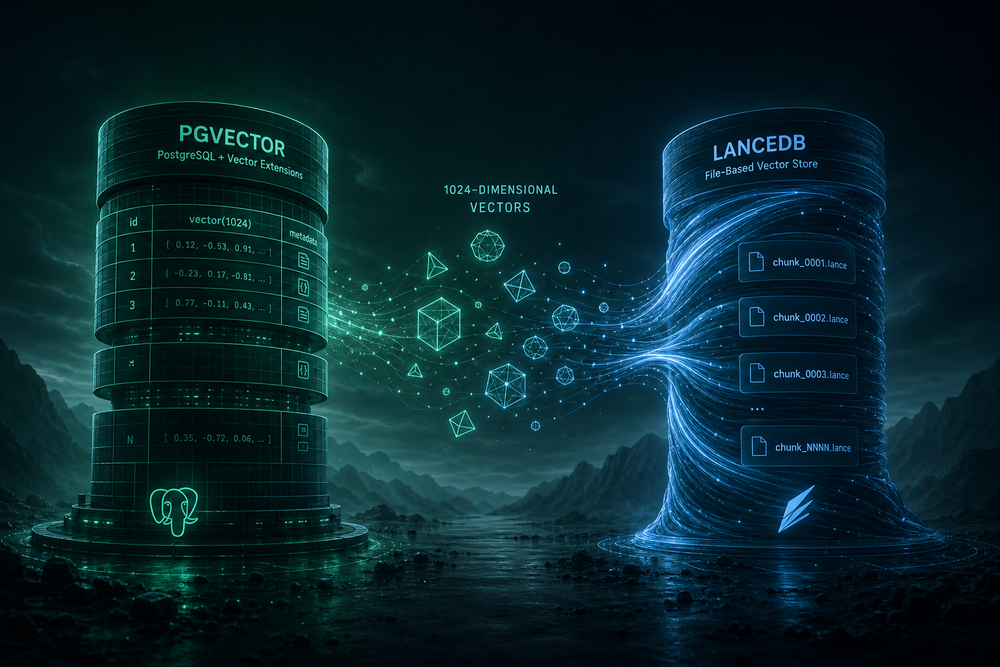
When I set up Honcho's vector store, I started with PGVector because it came bundled with the PostgreSQL container. Seemed logical — one less service to manage. Two hours later, I was switching to LanceDB. Here's what happened and why the choice between these two vector stores matters more than it first appears.
The Problem: Hardcoded Dimensions
Honcho's source code has a validation check for PGVector: exactly 1536 dimensions. No configuration option. No override. Just a hardcoded number buried in the source.
I was using baai/bge-m3 for embeddings via OpenRouter. It produces 1024-dimensional vectors. The moment Honcho tried to store them in PGVector, it threw:
Embedding dimension mismatch for openai:baai/bge-m3. Expected 1536, got 1024.My options were:
- Switch to an embedding model that outputs 1536 dimensions (OpenAI's text-embedding-3-small)
- Patch Honcho's source code
- Switch to a vector store without dimension constraints
Option 1 was out — OpenAI embeddings are blocked on OpenRouter ("No allowed providers available"). Option 2 meant maintaining a fork. I went with option 3.
LanceDB: The Flexible Alternative
LanceDB is a file-based vector store. No server. No dimension constraints. You point it at a directory and it stores vectors of any size.
Switching was one line in config.toml:
[vector_store]
TYPE = "lancedb"
DIMENSIONS = 1024
URI = "/app/lancedb_data"
That's it. No schema migrations. No dimension validation. It just works.
Comparing the Two
| Aspect | PGVector | LanceDB |
|---|---|---|
| Type | PostgreSQL extension | File-based (Apache Arrow) |
| Dimensions | Fixed at 1536 (in Honcho) | Any — configured per setup |
| Server required | Yes (PostgreSQL) | No |
| Persistence | PostgreSQL volume | Files on disk |
| Swap effort | Schema changes | Change TYPE in config |
The Permission Trap
Switching to LanceDB introduced a new problem: permissions. I initially used a bind mount:
volumes:
  - ./lancedb_data:/app/lancedb_data
The container runs as a non-root user. The host directory is owned by my local user. LanceDB couldn't write. I got silent failures — no errors in logs, just no vectors stored.
The fix was switching to a named Docker volume:
volumes:
  lancedb_data:
Docker handles the permissions internally. Named volumes are created with the right ownership for the container user. Problem solved.
When to Use Which
Use PGVector if:
- You're using OpenAI embeddings (1536-dim)
- You want vectors in the same database as your relational data
- You need ACID transactions across vectors and metadata
- You don't mind the extra PostgreSQL resource usage
Use LanceDB if:
- Your embedding model doesn't output 1536 dimensions
- You want simpler ops (no separate vector server)
- You need flexibility to change embedding models later
- You're running on constrained infrastructure
The Bigger Lesson
This wasn't just about vector stores. It was about hardcoded assumptions in infrastructure code. Honcho assumes everyone uses 1536-dim embeddings because that's what OpenAI outputs. But the embedding landscape is diverse:
- baai/bge-m3 — 1024-dim, 8K context, $0.01/M
- qwen/qwen3-embedding-8b — 4096-dim, 32K context, $0.01/M
- intfloat/e5-base-v2 — 768-dim
Hardcoding dimensions is a portability trap. LanceDB's flexibility isn't just convenient — it's future-proof.
Key Takeaways
- Check dimension constraints before choosing a vector store. PGVector's 1536-dim limit is baked into Honcho's source.
- LanceDB swaps in with one config change. No schema migrations, no data exports.
- Use named Docker volumes for file-based stores. Avoids permission headaches with bind mounts.
- Your embedding model choice affects your entire stack. 1024-dim models are common and cost-effective — make sure your infrastructure supports them.
I kept PostgreSQL running for relational data (messages, sessions, observations) but moved vectors to LanceDB. The two coexist fine. If I ever need to switch embedding models again, I just change DIMENSIONS in config.toml and restart.